
The Story
As the adventurers step inside the lighthouse, they are met by the low, persistent hum of an aging electrical system. The sound is steady at first, the vibration of an overworked transformer and current moving through corroded copper wiring installed long ago. Overhead lamps flicker intermittently, their filaments reacting to subtle drops and surges in voltage as the system struggles to regulate power.
The air seems tense. Each surge draws a sharper buzz from the fixtures. Each dip causes the light to dim, hesitate, and flare back. Somewhere within the walls, insulation has hardened with age, connections have oxidized, and the total load on the circuit exceeds what it was designed to carry. The fluctuations grow stronger. The hum deepens in pitch. The flickering accelerates into erratic pulses as voltage oscillates beyond safe limits.
Then comes a sudden metallic snap. A fuse ruptures under thermal stress, the circuit opens, and current ceases instantly. The humming stops. Darkness fills the chamber.
After a brief silence, one of the adventurers strikes flint to steel. A torch catches, its flame steady and chemical in its certainty. Unlike the strained electric light, the fire burns with stable convection and radiant heat. They advance by its warm glow, carrying that simple, reliable illumination with them as they continue deeper into the lighthouse.
Lighting Effects
In the following clip you can see the lights out scene along with additional footage with the torch from later in the story. The almost strobe-like effect of the lights going out was very effective in disorientating the players while the audio clues made it clear what the modulating lights represented. Before the lights out scene occured, a humming sound was playing ocassionaly and the lights would flicker, drawing attention to the lighting setup so that the later events, subtly priming players for a lighting transition that occurs.
The Torch
The torch is simply a fixed light with a flicker effect on it. It doesn’t interact with other lights from the environment. This makes sense as, in this case, the physical light maps directly to a a single light source ‘the torch’. As a creator the fact that the torch light is independent from other sources can be helpful in re-using it across scenes predictably. Of course, it’s light mixes in the physical world anyway even if it doesn’t in the virtual world.
The torch provides a warm light source against a dark ambience. The sound of a match being lit makes it clear that this light source is some sort of flame as does the flickering of the torch and gentle popping sound of it burning. These are subtle but important audio cues.
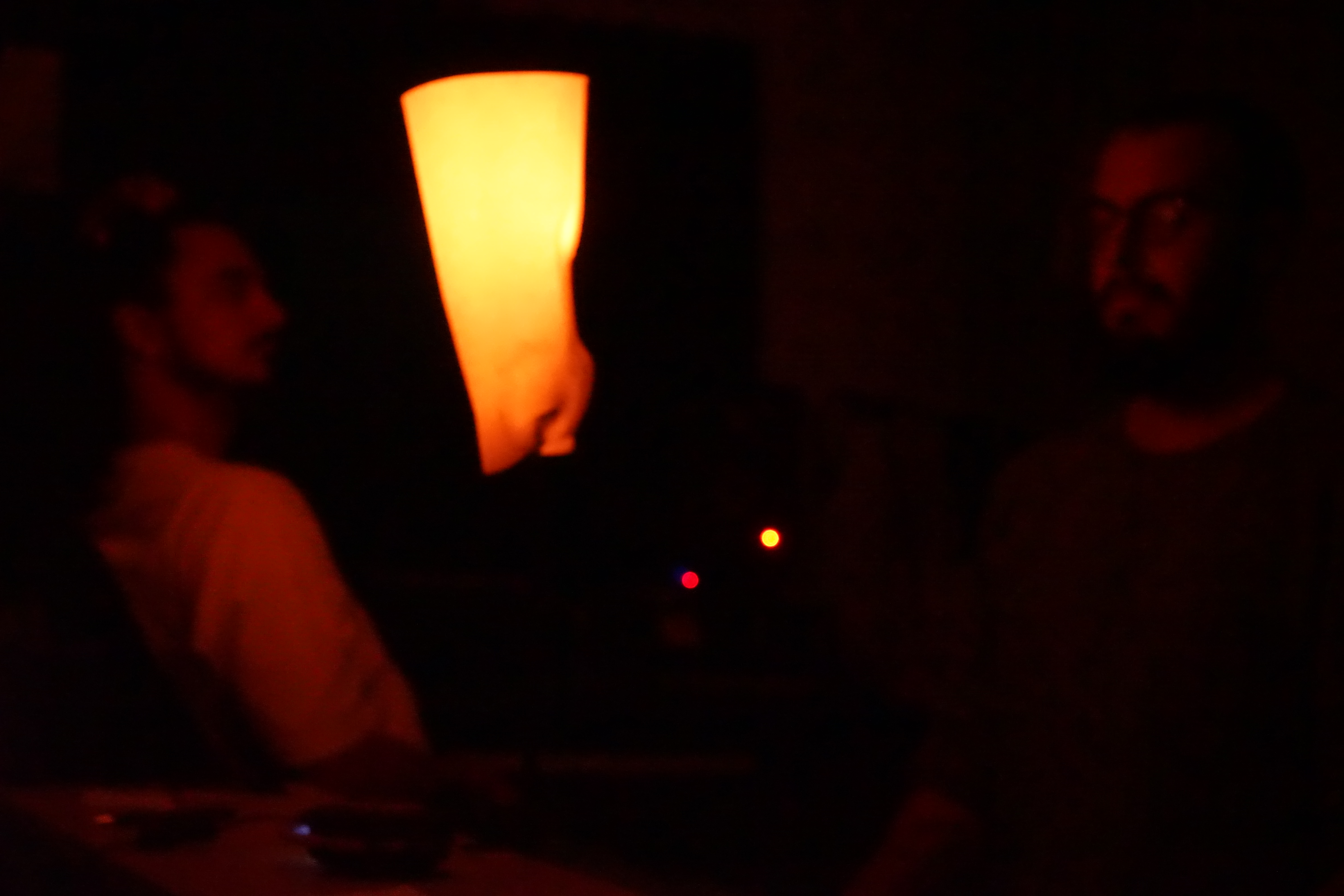
As the lamp is placed between the adventurers, it illuminates them and acts as a special object in their nearby personal space and they have to look past it to see one another. It also has the benefit of illuminating their character sheet so they can read and write on it.
Flickering Lights & Lights Out
The flickering light effect is controlled programmatically. Various lights are placed around the centre of the virtual scene. They vary in intensity by controlling their attenuation, from normal (0 attentuation) to a small (-0.1 to -1.0) increase for a flicker or off (10). Attentuation controls how light falls off over distance, increasing attenuation makes less light reach the lambertian sphere from which the tethered lights stream their values. Godot also permits negative attenuation which makes the light brighter.
The lights flicker in bursts. How frequent these bursts are, how long they last and how dense the flickering is, is all varied. The lights out events decreases the attenuation from -0.1 to -1, making the lights brighter and brighter before turning of all the lights abruptly. These control variables and set and varied via keyframe animations though most of the heavy lifiting is done in code.
using Godot;
using System;
using System.Collections.Generic;

public partial class FlickeringLight : Node
{
    // -----------------------------
    // Inspector (Exports)
    // -----------------------------

    [ExportGroup("Light list")]
    [Export] private SpotlightOnSphere[] _lights = Array.Empty<SpotlightOnSphere>();

    [ExportGroup("Boolean Control")]
    [Export] public bool ActivateFlickering = false;
    [Export] public bool KillAllLights = false;

    [ExportGroup("Time between flickers")]
    [Export] private float _minIntervalSeconds = 2f;
    [Export] private float _maxIntervalSeconds = 4f;

    [ExportGroup("Flicker Burst Properties")]
    [Export] private float _burstDurationSeconds = 0.5f;

    [Export] private int _minTogglesPerBurst = 4;
    [Export] private int _maxTogglesPerBurst = 8;

    [ExportGroup("Attenuation Values (your convention)")]
    [Export] private float _normalAttenuation = 0f;      // Normal steady value
    [Export] private float _flickerAttenuation = -1f;     // Value used during flicker phase
    [Export] private float _killedAttenuation = 10f;      // Forced-off / killed value

    [ExportGroup("Interval randomization")]
    [Export] private bool _useNormalDistributionForInterval = false;
    // If true: uses Randfn(mean, stddev) with:
    [Export] private float _intervalMeanSeconds = 3f;
    [Export] private float _intervalStdDevSeconds = 0.5f;

    // -----------------------------
    // Internal state machine
    // -----------------------------

    private enum FlickerState
    {
        Disabled,   // flicker logic off; keep lights at normal attenuation
        Waiting,    // waiting for next burst
        Bursting    // currently running a burst (toggling attenuation)
    }

    private FlickerState _state = FlickerState.Waiting;

    // Waiting state
    private float _timeSinceLastBurst = 0f;
    private float _nextBurstDelay = 0f;

    // Bursting state
    private float _burstTime = 0f;
    private readonly List<float> _flipTimes = new(); // times within burst when we toggle
    private int _nextFlipIndex = 0;
    private bool _useNormalAttenuationThisPhase = true;

    public override void _Ready()
    {
        // Start in a consistent state.
        _state = FlickerState.Disabled;
        _timeSinceLastBurst = 0f;
        _nextBurstDelay = SampleNextIntervalSeconds();

        ApplyAttenuationToAll(_normalAttenuation);
		ActivateFlickering = false; // By default the lights don't flicker.
    }

    public override void _Process(double delta)
    {
        float dt = (float)delta;

        // 1) Hard override: kill lights always wins.
        if (KillAllLights)
        {
            ApplyAttenuationToAll(_killedAttenuation);
            _state = FlickerState.Disabled; // freeze flicker logic while killed
            return;
        }

        // 2) If flickering is disabled, keep a steady value and exit.
        if (!ActivateFlickering)
        {
            ApplyAttenuationToAll(_normalAttenuation);
            _state = FlickerState.Disabled;
            return;
        }

        // If we were disabled and flicker got re-enabled, resume waiting.
        if (_state == FlickerState.Disabled)
        {
            EnterWaitingState();
        }

        // 3) Run the state machine.
        switch (_state)
        {
            case FlickerState.Waiting:
                UpdateWaiting(dt);
                break;

            case FlickerState.Bursting:
                UpdateBursting(dt);
                break;
        }
    }

    // -----------------------------
    // State updates
    // -----------------------------

    private void UpdateWaiting(float dt)
    {
        _timeSinceLastBurst += dt;

        if (_timeSinceLastBurst >= _nextBurstDelay)
        {
            StartBurst();
        }
        else
        {
            // Optional: ensure lights stay normal while waiting.
            // (If other systems can change attenuation, keep this line.
            // Otherwise you can remove it to save writes.)
            ApplyAttenuationToAll(_normalAttenuation);
        }
    }

    private void UpdateBursting(float dt)
    {
        _burstTime += dt;

        // End of burst: restore, then go back to waiting.
        if (_burstTime >= _burstDurationSeconds)
        {
            ApplyAttenuationToAll(_normalAttenuation);
            EnterWaitingState();
            return;
        }

        // Toggle phase when we pass scheduled flip times.
        // While-loop = catch-up if dt is large (lag spikes).
        while (_nextFlipIndex < _flipTimes.Count && _burstTime >= _flipTimes[_nextFlipIndex])
        {
            _nextFlipIndex++;
            _useNormalAttenuationThisPhase = !_useNormalAttenuationThisPhase;
        }

        float attenuation = _useNormalAttenuationThisPhase ? _normalAttenuation : _flickerAttenuation;
        ApplyAttenuationToAll(attenuation);
    }

    // -----------------------------
    // Transitions / helpers
    // -----------------------------

    private void StartBurst()
    {
        _state = FlickerState.Bursting;

        _burstTime = 0f;
        _nextFlipIndex = 0;

        int toggleCount = GD.RandRange(_minTogglesPerBurst, _maxTogglesPerBurst);

        // Start in the "flicker" value first (so it immediately looks like a flicker burst started).
        _useNormalAttenuationThisPhase = false;

        // Precompute evenly spaced flip times across the burst.
        _flipTimes.Clear();
        _flipTimes.Capacity = Math.Max(_flipTimes.Capacity, toggleCount);

        for (int i = 1; i <= toggleCount; i++)
        {
            // Fit on/off changes into burts time
            float t = _burstDurationSeconds * ((float)i / toggleCount);
            _flipTimes.Add(t);
        }

        // Apply first phase immediately.
        ApplyAttenuationToAll(_flickerAttenuation);
    }

    private void EnterWaitingState()
    {
        _state = FlickerState.Waiting;

        _flipTimes.Clear();

        _timeSinceLastBurst = 0f;
        _nextBurstDelay = SampleNextIntervalSeconds();

        ApplyAttenuationToAll(_normalAttenuation);
    }

    private float SampleNextIntervalSeconds()
    {
        if (_useNormalDistributionForInterval)
        {
            // Randfn(mean, stddev). Clamp to avoid negative/too-small intervals.
            float v = (float)GD.Randfn(_intervalMeanSeconds, _intervalStdDevSeconds);
            return Mathf.Max(0.05f, v);
        }
        else
        {
            // Uniform between min/max.
            return (float)GD.RandRange(_minIntervalSeconds, _maxIntervalSeconds);
        }
    }

    private void ApplyAttenuationToAll(float attenuation)
    {
        // Centralize the write so it's easy to change later (e.g., if you want per-light variance).
        foreach (var spot in _lights)
            spot.spotLightAttenuation = attenuation;
    }
}